Duas & remembrance
Use a Digital Tasbih Counter Without Losing Focus
Set up a tasbih counter on the web or in the app, test Undo and Reset, choose saving with care, and keep the goal apart from a sourced count.
Editorial writing date:
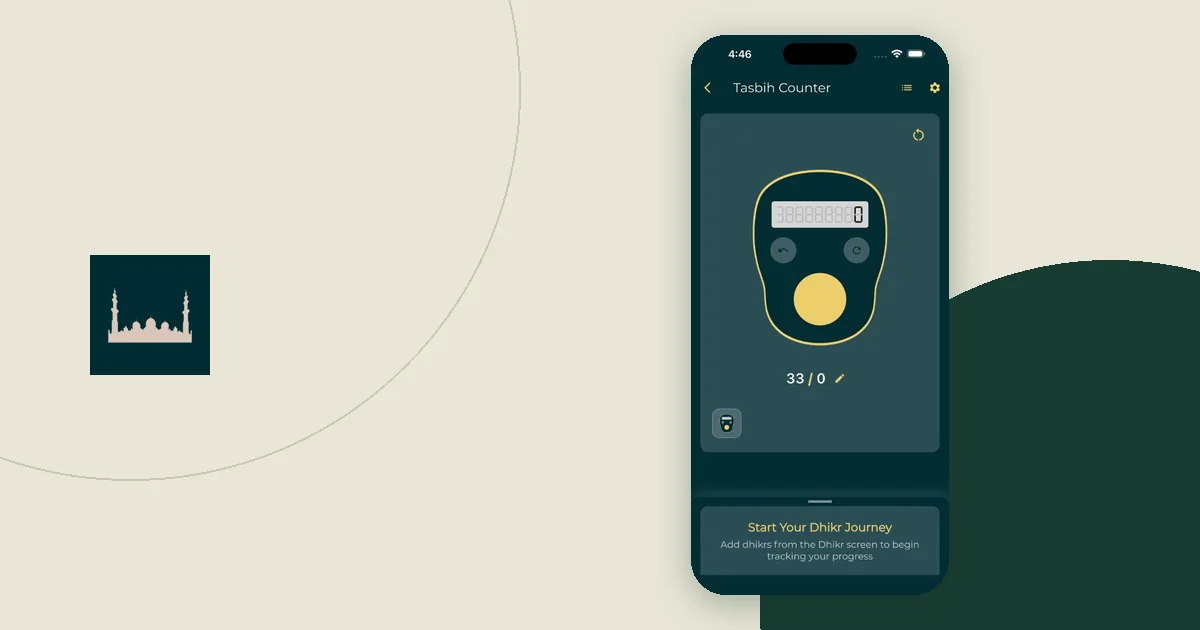
Know what you are reciting, and where its count comes from, before you touch the counter. Then set the goal, try Undo and Reset once, decide whether the count should be saved, and silence anything that could interrupt you. The number on the screen records your taps. It cannot confirm the words, measure sincerity or decide reward.
Key Takeaways
- Take the wording and any count from a named source, such as Sahih Muslim 597a for after-prayer dhikr.
- A counter's goal is a software setting. It does not tell you how many times to recite.
- Try Undo and Reset in a short test before a real session.
- On iPhone and Android, a saved web count lives in that one browser, and clearing its website data can remove it.
- Silence other notifications with Focus or Do Not Disturb so alerts do not interrupt the count.
Start with the practice, not the preset
A counter shows a number without saying where it came from. Before you use a preset, check that it matches the practice you have learned.
For example, Sahih Muslim 597a describes glorifying Allah thirty-three times, praising Him thirty-three times and declaring His greatness thirty-three times after every prayer. That makes ninety-nine. The narration then completes a hundred with these words, as printed on Sunnah.com:
لاَ إِلَهَ إِلاَّ اللَّهُ وَحْدَهُ لاَ شَرِيكَ لَهُ لَهُ الْمُلْكُ وَلَهُ الْحَمْدُ وَهُوَ عَلَى كُلِّ شَىْءٍ قَدِيرٌ
The Sunnah.com English renders them as "There is no god but Allah, having no partner with Him, to Him belongs sovereignty and to Him is praise due, and He is Potent over everything." Read the full narration there, including what it says about the practice.
The lesson for software is simple: keep the wording, the counts and the reference together. An adjustable number does not create a Sunnah practice. If you have a question about using a digital aid, or about the practice itself, take it to a qualified teacher.
Web counter or app counter?
Everyday Muslim offers a counter in two places. Both count taps; they differ in what they keep.
| Online tasbih counter | Everyday Muslim app (iPhone and Android) | |
|---|---|---|
| Goal | Any whole number from 1 to 100,000; counting continues past it | A target count you set for each dhikr |
| Resetting | Reset asks you to confirm, and Undo can reverse it during the visit | Reset Statistics for a dhikr asks you to confirm and cannot be undone |
| Saving | Off until you turn on "Remember on this device" | Kept in the app, with dhikr statistics; Backup & Restore lists Tasbih as its own category |
| Sound and vibration | Silent; no microphone access | Tasbih Settings has sound, vibration and reminders |
| Dhikr wording | You bring your own | Dhikr collection with references, plus custom entries |
The two do not sync. A count saved in a browser will not appear in the app, and the app's statistics do not include browser sessions.
Illustration: one after-prayer session
The steps below illustrate how to use the controls. They are not a ruling on how to count.
Imagine a user who wants to follow Sahih Muslim 597a after a prayer. The counter has one goal, but the practice has four parts. So they set the goal to 100 and treat 33, 66 and 99 as the points where they move to the next phrase.
- They open the counter and check that it shows 0, not a number from yesterday.
- They confirm the goal reads 100.
- They count. At 33 they move from glorifying to praising, and at 66 to declaring greatness.
- On the tap that should reach 41, their thumb slips and registers twice, showing 42. They know the extra tap was an accident, so they press Undo once and it returns to 41.
- At 99 they say the completing words, tap once more, and stop at 100.
Step 4 is an interface correction for a tap they know was wrong. It is not a way to resolve doubt about the recitation itself. If you are unsure whether you said a phrase, seek sound guidance rather than asking the software to decide.
Check the controls before you begin
Run through this list once with no worship record attached:
- Check the current count instead of assuming it is zero.
- Read the goal and remind yourself where that number came from.
- Press Undo after a test tap to see what it reverses. On the website, Undo can step back through up to 50 recent changes during the visit.
- Open Reset and cancel it, so you know the confirmation step.
- Decide whether this browser or app should keep the count.
- Hold the phone so the count button sits under your thumb without stretching.
If you are unsure how a control behaves, stop testing on a count you meant to keep.
Understand saving on iPhone and Android
On the website, "Remember on this device" saves the count and goal in that browser only. Clearing the browser's website data can remove it:
- iPhone, Safari: Settings, then Apps, then Safari. Apple describes two routes: Clear History and Website Data, or Advanced, Website Data and Remove All Website Data (Apple's Safari guide).
- Android, Chrome: the More menu, then Delete browsing data, then More options and Cookies and site data. Google lists Web Storage among the site data that is deleted (Google's Chrome guide).
On a shared phone or tablet, another person can open the same page and see a saved count. Turn saving off if you do not want it kept, then reload to check. In the app, Backup & Restore copies only the categories you select to your account, and Tasbih is one of them. The backup and restore help explains which account holds that copy.
Sharing is a separate choice again. Khair Partners lets you pick which worship areas, including dhikr, a partner can see. The website counter never adds to partner records. Settle these saving and sharing choices before you start, so no setting pulls your attention away in the middle of a count.
Silence the phone, not just the counter
A notification that arrives mid-count can easily make you lose your place. Turn other alerts off for the session:
- iPhone: open Control Center, tap Focus, then turn on Do Not Disturb. To keep one app's alerts, set up a Focus and choose its allowed Apps (Apple's Focus guide).
- Android: swipe down and tap the Do Not Disturb tile in Quick Settings. Google notes that menus can vary by phone (Google's Do Not Disturb guide).
In the app, Tasbih Settings also controls feedback on each tap. With tap feedback off, only the alert at your goal plays. Choose whichever helps you keep your eyes off the screen. The low-distraction setup guide shows how to match each kind of interruption to a phone control.
Ask whether the counter is helping
The Quran describes hearts finding comfort in the remembrance of Allah in Ar-Ra'd 13:28. That is a spiritual statement. It is not a claim that any counter produces a measurable outcome.
So ask practical questions instead. Are you watching the number more than the words? Do you open statistics after every session? Does a large goal pull you toward comparing yourself with others? If so, simplify: skip the statistics screen, choose a smaller goal that matches your source, or count on your fingers for a while. The guide to worship goals without scores explains why a tally should stay a tool.
For building a routine around sourced words, continue with the morning and evening remembrance guide. Keep the collection, the counter and any personal record apart, so each has one clear job.