Duas & remembrance
Build a Small Personal Collection of Everyday Duas
Build a small dua collection with the source beside each entry, keep your notes apart from quoted text, and follow one full example in the app.
Editorial writing date:
Start with a handful of duas you actually use, each with its wording, meaning and source in one place. Put your own notes in a separate field. A small, well-labeled collection is easy to find, learn from and correct. A folder of screenshots whose origins you can no longer trace is not.
Key Takeaways
- Every entry needs a reference you can open, such as a verse number or a hadith number.
- Keep the Arabic, the translation, the transliteration and your own notes in separate fields.
- Do not add times, counts or rewards that the source does not state.
- On iPhone and Android, a dua widget and a Duas backup help you reach and keep the collection.
- Check an entry against its source again before you share it.
Decide what the collection is for
Start with a few duas you already say or want to learn. Then give the collection one job: learning new wording, returning to Quranic supplications, or finding the right words at a recurring moment such as leaving home.
The Quran speaks of Allah's nearness and His response to the one who calls on Him in Al-Baqarah 2:186. Your collection helps you find words. It is not a condition for making dua, and it cannot promise when or how a request is answered.
Give folders plain names, such as "Learning this month" or "Quranic duas." Avoid folder names that make a promise, like "Duas for guaranteed success."
Use one record for every entry
For a Quranic dua, record the surah and verse. For a narrated dua, record the collection and hadith number, plus any grading the source page shows. Use the same fields every time:
| Field | What to record |
|---|---|
| Title | A short label you will recognize |
| Arabic | Copied from the source page |
| Meaning | The translation, and whose translation it is |
| Transliteration | Marked as a reading aid, not the original |
| Reference | A link and the verse or hadith number |
| Context | Only instructions the source itself gives |
| My note | Your own question or reminder, labeled as yours |
Do not label text "from the Sunnah" because it sounds familiar. A social post, search summary or AI answer can point you to a reference, but it does not prove the attribution. If you cannot find the source, keep the entry out of the sourced collection until you can.
Worked example: the dua for leaving home
The example below shows how one entry is built. It is an illustration of record-keeping, not an instruction to recite at a set time or count.
1. Find the source. Sunan Abi Dawud 5095 sits in the chapter "What to say when leaving one's home." Anas ibn Malik narrates the words. Sunnah.com shows the grading as Sahih (Al-Albani).
2. Copy the Arabic from that page:
بِسْمِ اللَّهِ تَوَكَّلْتُ عَلَى اللَّهِ لاَ حَوْلَ وَلاَ قُوَّةَ إِلاَّ بِاللَّهِ
3. Add the meaning, with its source. The Sunnah.com English reads: "In the name of Allah, I trust in Allah; there is no might and no power but in Allah."
4. Fill in the rest of the record:
| Field | Entry |
|---|---|
| Title | Leaving home |
| Reference | Sunan Abi Dawud 5095, graded Sahih (Al-Albani) on Sunnah.com |
| Context | Said when a person goes out of his house, as the narration states |
| Transliteration | Bismillāh, tawakkaltu ʿalallāh, lā ḥawla wa lā quwwata illā billāh (reading aid, as given in the daily duas table) |
| My note | Ask my teacher about the pronunciation of "ḥawla" |
5. Leave out what the source does not say. The narration describes what is said to the person who says these words. Keep that in the source link rather than rewriting it as your own promise. Do not add a number of repetitions.
The daily duas page has a table of fifteen everyday duas, including this one, each with its Arabic, transliteration, meaning and reference. Use it to check your copy. Its English is a different translation from the Sunnah.com one: it reads "I place my trust in Allah" and "except with Allah," so record whose translation you copied.
Build the entry in Everyday Muslim
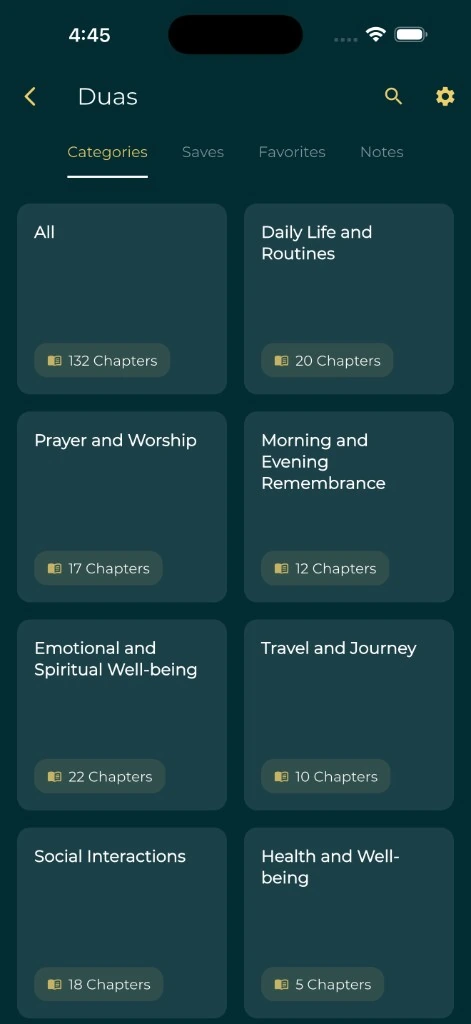
The Everyday Muslim app on iPhone and Android includes the Hisnul Muslim collection. Its Duas screen has four tabs: Categories, Favorites, Saves and Notes. To set up the example:
- Open Duas, then Categories, and find the chapter "When leaving home."
- Mark it as a favorite so it appears in the Favorites tab.
- Save it into a folder such as "Learning this month."
- Add your note in the Notes field. Keep it short and clearly yours.
- If you want a dua that is not in the collection, use Add Your Dua. Give it a title and paste the text with its reference. The app keeps custom entries apart from the built-in collection, but typing text in does not make it sourced.
Two device features help you return to the collection:
- A Home Screen widget. Everyday Muslim includes a dua last-read shortcut widget. The widgets page lists what is available.
- iPhone: touch and hold the Home Screen, tap Edit, then Add Widget (Apple's widget guide).
- Android: touch and hold an empty area, tap Widgets, and drag one into place (Google's widget guide).
- A backup. Backup & Restore lists Duas as its own category, covering items such as saved duas, folders and custom duas. Check the latest successful date before changing phones; the backup and restore help explains the steps.
Keep learning aids labeled
A translation explains meaning in another language. Transliteration shows pronunciation in another script. Neither should be merged into the Arabic. When you copy an entry, check that no line went missing or slipped into the wrong field.
In Dua Settings you can show or hide the Arabic, translation, transliteration and source, and set a font size for each. Turn the source on while you are building your collection, so you see the reference every time.
Use a reliable recording when one is available, and ask a teacher about sounds you cannot resolve. The app does not promise audio for every dua, and playback can need a connection. The Quran translation guide explains why a short English gloss is never the whole meaning.
Keep personal writing separate
You may want to remember to pray for a relative, or to note something on your mind. Put that under "My note," not in the Arabic or translation field. Do not style it as a verse or hadith.
Avoid storing private details in a collection you plan to show anyone. If a reflection belongs in a journal, keep it there and use the private journal checklist.
Check an old screenshot before you add it
If your collection began as a folder of saved images, run these checks before moving one into it:
- Find the original reference. If the image gives none, search the words on Quran.com or Sunnah.com.
- Compare the Arabic word by word with the source page.
- Identify whose translation the image uses.
- Look for any count, time or reward in the caption, and confirm the source states it. If it does not, leave it out.
- Read the finished entry as a stranger would. Can you tell which words are quoted and which are yours?
Apply the same checks before sharing. Send a clean, sourced entry and keep your notes out of the message. If you make a card from a dua with Islamic Cards, review the finished card before sending it.
For reminders built around entries you have checked, continue with the morning and evening remembrance guide.