
Khair Partners · Consistency, together
A little encouragement can travel far.
Build your prayer routine with people you trust. Khair Partners brings prayer accountability partners, selected progress sharing and supportive groups into Everyday Muslim.
- Connect with trusted people
- Choose what to share
- Encourage with Khair Notes
Track prayers with friends
A prayer reminder tells you the time. An accountability partner can encourage you to make room for it. Connect with friends or family who want to support the same daily routine, then choose the worship areas you want to share.
Khair Partners is the feature name; prayer accountability is the purpose. It works alongside your own prayer tracker, so you can decide when a personal routine would benefit from a trusted circle.
Connect with a code or QR
In the Code tab, generate your unique code and share it with a person you trust. Your partner can scan the QR code or enter the code to connect. The Partners tab also has an add button for entering or scanning someone else's code.
Connection requests appear through the bell icon. Accept or reject a request, and choose what that partner can see. Review the choices for each connection instead of assuming all activity is automatically private or automatically shared.
Choose the progress you share
The app lets you choose worship areas for accountability, including prayer, fasting, dhikr, Quran and Asma'ul Husna. You can change these choices when accepting a request or in partner settings.
The selected areas are synced and visible to that partner. Shared features require online services, so they have different privacy behavior from a local-only tracker. Read the current policy before sharing records.
Find a rhythm as a group
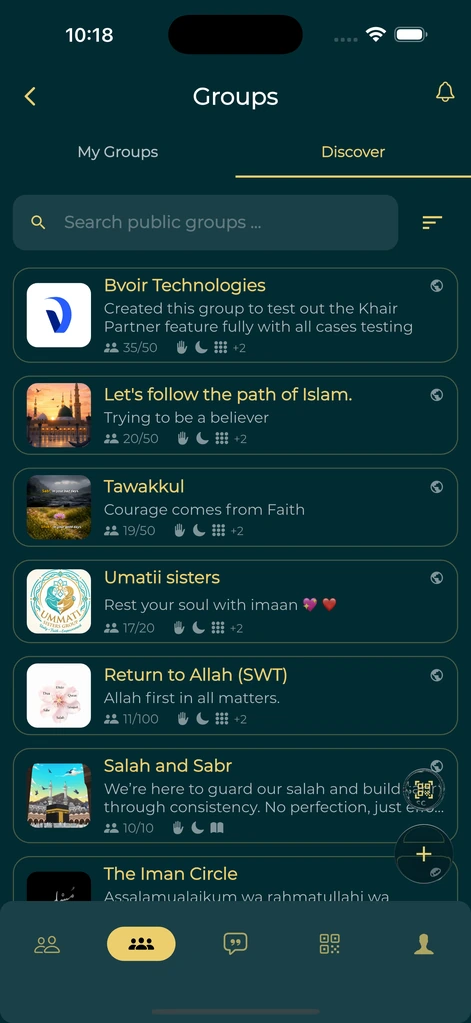
Create or join a group when a wider circle helps. Group admins manage members and join requests, and you can review group notifications and their settings.
Use shared progress, leaderboards and Khair Notes for encouragement. Agree with your partners on the kind of support that feels helpful, and keep private worship private when that is what you prefer.
A simple place to start
Make it part of your day.
Generate your code
Open the Code tab in Khair Partners.
Connect with someone you trust
Share your QR or code, or scan theirs from the Partners tab.
Review sharing choices
Choose the worship areas visible to each partner.
Encourage one another
Follow progress, join groups and send caring Khair Notes.
A few useful answers
Before you begin.
Can I use this as a prayer tracker with friends?
Yes. Khair Partners connects prayer tracking with optional accountability relationships and groups.
Does every partner see all my worship activity?
You choose which supported worship areas to share with each partner and can review those settings later.
Can I still use the app without joining a group?
Yes. Khair Partners is optional. Prayer times, Quran and other features remain available without joining a group.
Is shared progress stored only on my device?
No. Khair Partners profiles, groups, notes and selected shared activity can be stored using Firebase services. See the current privacy policy for details.
Made by Muslims. For Muslims.
Keep your essentials close.
Prayer times, Quran, Qibla and worship trackers. Free and ad-free.