Learning & reflection
Use a Hijri Calendar Without Assuming Local Dates
Plan with a Hijri calendar while you wait for your local announcement. Learn calculated vs announced dates, sunset start times and when to adjust the app.
Editorial writing date:
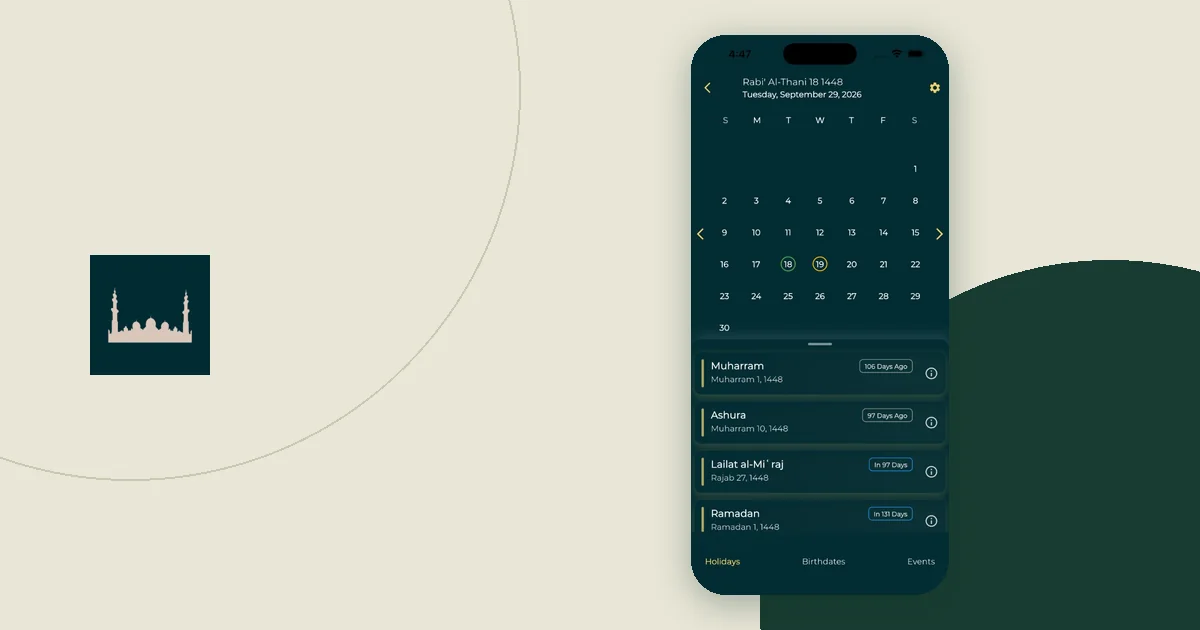
A Hijri calendar app shows a calculated date. Your community may start the month from an announced date instead. The two often match, but not always. Plan with the calculated date, mark it as provisional, and confirm it with the authority you follow before you share it as fact.
Key Takeaways
- A calculated Hijri date is a planning estimate, not a local announcement.
- Islamic dates begin at sunset, so a date listed as 1 Ramadan starts the evening before.
- Mark plans "provisional" until your local authority confirms the month.
- Change the app's Hijri Date Adjustment only after you know which date you want to match.
Calculated dates and announced dates
A Hijri month has 29 or 30 days. In Sahih al-Bukhari 1913, the Prophet ﷺ says "The month is like this and this," and the narration explains this as "sometimes of 29 days and sometimes of thirty days." The question is how a given month is known to have begun.
The US Naval Observatory's Islamic calendar page explains that a month traditionally begins when the thin crescent is seen in the western sky after sunset. A calendar printed months in advance cannot wait for that sighting. It has to use a calculation.
Communities handle this in different ways. Some wait for a sighting. Others follow a calculated calendar. R.H. van Gent of Utrecht University describes Saudi Arabia's Umm al-Qura calendar as a calculated lunar calendar. He also notes that the dates different Muslim communities observe for major festivals can "differ by one, two or even three days."
So when two calendars disagree, neither one is necessarily broken. They may be using different methods. Which method to follow is a religious question for qualified scholars and your local mosque, not for an app setting.
Why a new-moon icon is not a sighting
The USNO crescent visibility page says the date and time of each new moon "can be computed exactly." Seeing the first crescent is a different matter: the same page says it "cannot be predicted with certainty." It depends on sky conditions, the observer's location and experience, and the moon's position.
A new-moon symbol on a calendar tells you when the astronomical new moon happens. It does not report that anyone in your area saw the crescent.
The hadith in Sahih al-Bukhari 1909 links the start and end of fasting to seeing the crescent. It adds that if the sky is overcast, Sha'ban is completed to thirty days. How communities apply this today is a matter for scholars. For planning, the practical point is simple: the start of Ramadan can depend on an event that happens on the evening itself.
Check which evening a date means
Islamic dates begin at sunset. The USNO Islamic observances service states that its dates "begin at sunset of the previous evening" and run until sunset on the listed day. The same page notes that, in practice, fasts and festivals are set by the visibility of the crescent.
This matters most for evening plans. Suppose a calendar shows 1 Ramadan on a Thursday. By that convention, the Islamic day starts at sunset on Wednesday. A family invitation that says only "Thursday, 1 Ramadan" leaves people unsure which evening you mean.
Write the evening into any shared plan: "Wednesday evening, after Maghrib" is clearer than an all-day entry.
Keep that evening apart from the first iftar. The sunset that begins 1 Ramadan comes before the first fast, so no fast ends that evening; suhoor for the first fast is still ahead. The first iftar comes at the next sunset, at the end of the first day's fast.
A worked example: when the month starts a day later
Illustration only. Amina, her dates and her mosque's announcement are invented to show the steps. They are not a forecast or a ruling.
Amina's calendar app shows 1 Ramadan on a Thursday. She books a family iftar for Thursday evening and sends an invitation.
- She labels it. The invitation reads: "Iftar Thursday — provisional, waiting for our mosque's announcement."
- She notes the source. In her own notes she writes: "App date: calculated. Confirm with our local mosque on Wednesday evening."
- The announcement differs. On Wednesday evening, her mosque announces that Sha'ban will be completed to thirty days. In her community, Ramadan will begin a day later than the app showed.
- She updates the plan. The first fast in her community is now Friday, not Thursday. She moves the family iftar to Friday evening and messages everyone: "Updated: iftar Friday. Our mosque confirmed tonight."
- She adjusts the app. The app is one day ahead of the date she follows. She opens the Hijri Date Adjustment setting and moves the display back one day. Then she checks that today's Hijri date and her Ramadan reminders now match the announcement.
- She flags it for others. Her brother lives in another country. She tells him to check his own local announcement rather than copying her date.
Each step answers one question: what is this date based on, who confirms it, and which copies need fixing afterward.
A record you can keep for each observance
Use a simple record like this while you plan. It is an optional organizer, not a religious procedure.
| Item | What to write down | Example (illustration) |
|---|---|---|
| Calculated date | Where the date came from | "App, calculated: 1 Ramadan Thursday" |
| Status | Provisional or confirmed | "Provisional" |
| Confirming authority | Who you follow and where they announce | "Local mosque, Wednesday evening" |
| Evening meant | Which sunset begins the day | "Starts Wednesday after Maghrib" |
| Shared copies | Who has the plan | "Family group, two calendar invites" |
| Correction | What changed and when | "Moved to Friday after announcement" |
The Ramadan preparation guide shows how to use a provisional start date in a household plan.
Adjust the app after you confirm the date
The Hijri calendar feature in Everyday Muslim includes a Hijri Date Adjustment setting for when the displayed date differs from the local date you follow. The same page also lists the 12 Hijri months with their Arabic names. The feature is a planning tool. It is not a live announcement of the month.
Use the adjustment in this order:
- Confirm the announced date from the authority you follow.
- Compare it with the date the app shows.
- Move the display forward or back to match.
- Check today's date, upcoming events and reminders.
Do not change the setting just to make a countdown look right. The adjustment records which date you have chosen to match. It does not confirm the announcement for anyone else.
If you use Calendar Sync, check the destination calendar after a change. The feature page notes that synced entries can follow that calendar's own sharing settings. Older exported events, screenshots and other people's copies will not update by themselves.
Plan alerts around the confirmed date
A reminder to prepare suhoor is not the same as the time a fast begins. The suhoor and iftar reminder guide explains how to keep those two apart. Once your date is confirmed, recheck any alerts you set from the calculated date.
Prayer times can differ between apps for a similar reason: different calculation settings. The guide to why prayer apps show different times covers that side of the problem.
Keep old screenshots from looking current
A screenshot of last week's provisional date can circulate long after it is wrong. Delete outdated images from shared chats, or add a note such as "superseded — see update."
If you log fasts, record the dates you actually observed. The fasting-record guide explains how to keep a log factual without asking it to make religious judgments.
The order stays the same for every observance. Treat the calculated date as provisional, confirm it with the authority you follow, adjust the app to match, then update every copy you shared.