
Everyday Muslim · Hijri calendar
Keep Islamic dates in your everyday calendar.
See Hijri and Gregorian dates, explore Islamic events and keep meaningful dates close. Everyday Muslim brings its Islamic calendar together with your prayer and fasting tools.
- Hijri & Gregorian dates
- Events & birthdays
- Date adjustment
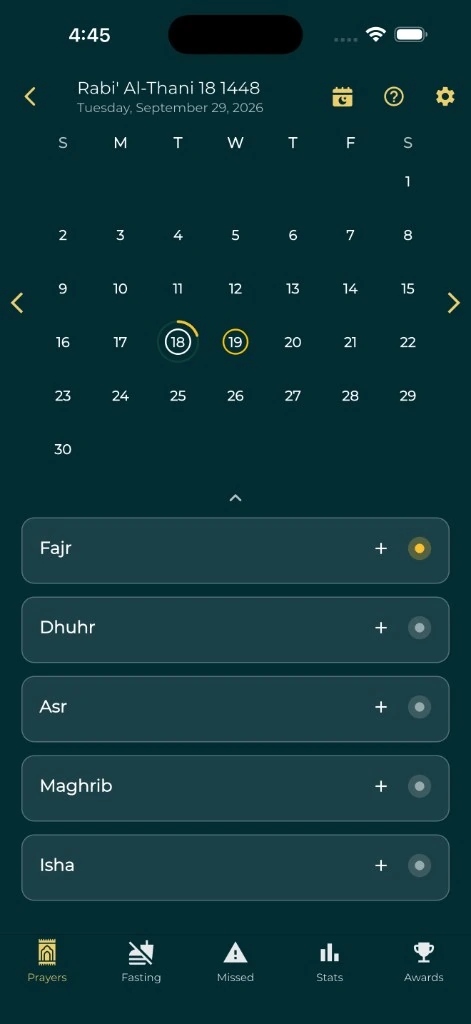
Move between the two calendars
Browse the Hijri calendar alongside Gregorian dates to plan ahead without repeatedly converting dates elsewhere. Open a day or an event for the information available in the app.
The feature also includes Islamic events and a timeline for exploring historical context. This page describes the app; it is not a live announcement of today’s local Hijri date or the start of Ramadan.
Match the date followed by your community
Use the app’s Hijri date adjustment when its displayed date differs from the local date you follow. A calculated calendar is useful for planning, while observance dates can depend on local moon-sighting decisions.
Before making plans around Ramadan, Eid or another observance, confirm the announcement from your trusted local authority. A reminder based on an estimated calendar date is not a moon-sighting announcement.
Remember birthdays and important occasions
Use the Hijri birthday feature to find and save a birthday in the Islamic calendar. Review holiday reminder settings if you want the app to notify you about selected occasions.
Reminders depend on notification permissions and your device settings. Keep your date adjustment current so the dates you see and the reminders you expect stay aligned.
Bring dates into your device calendar
Calendar Sync in Settings can add prayer times and Hijri dates to a calendar you select. Choose what to include and how far ahead to sync, then review the result in your calendar app.
Calendar access is optional. If the chosen calendar syncs to a cloud account or is shared, its entries can follow that calendar’s sharing settings. Review the destination before enabling it.
Explore prayer times and settingsA few useful answers
Before you begin.
Can the Hijri date be adjusted?
Yes. Everyday Muslim includes a Hijri date adjustment setting so the display can follow the local date you use.
Does this calendar determine when Ramadan or Eid starts?
No. Use it for planning and confirm observance dates with your trusted local authority.
Can I find my Hijri birthday?
Yes. The app includes a Hijri date-of-birth feature and saved birthday tools.
Can it sync with my phone’s calendar?
Yes. Calendar Sync supports prayer times and Hijri dates after you choose a destination calendar and grant the necessary permission.
Made by Muslims. For Muslims.
Keep your essentials close.
Prayer times, Quran, Qibla and worship trackers. Free and ad-free.