
Islamic fasting · Keep your record close
Every fast has a place in your calendar.
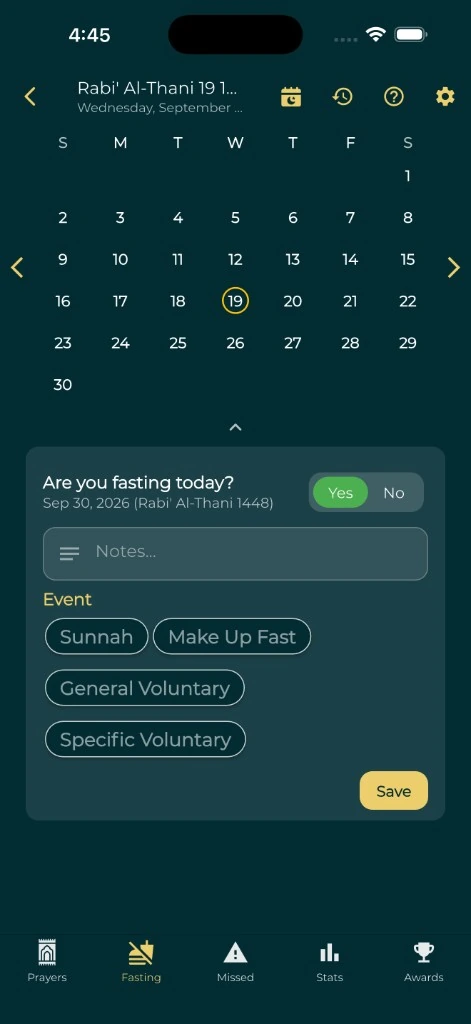
Use Everyday Muslim's Islamic fasting tracker to record Ramadan, Sunnah and make-up fasts, add notes and return to your history when you need it.
- Ramadan & Sunnah records
- Make-up fasts & notes
- Prayer tracking included
One record across the year
Fasting records are useful beyond Ramadan. Keep the days you fast in the same calendar as your prayer history, and return to those entries instead of keeping separate scraps of notes.
Everyday Muslim supports recording Sunnah and make-up fasts as well as your other fasting entries. Add context in notes so a past entry makes sense when you revisit it.
Keep make-up fasts visible
Use your record to organize the make-up fasts you need to complete. Enter fasts as you keep them, review your calendar and check the history before updating any personal total.
A tracker records what you enter. It does not determine your religious obligations, decide exemptions or replace advice from a qualified scholar about your circumstances.
Prayer and fasting in the same routine
Your fasting day is connected to the prayers around it. Everyday Muslim puts prayer times, adhan settings, prayer tracking and fasting history in one app, with detailed statistics available when you want to review your routine.
The online prayer calculator can help you check a selected date and location. Match the method used by your trusted local timetable when checking Fajr or Maghrib.
Check prayer timesEncouragement is optional
If support helps you follow through, Khair Partners lets you choose fasting as an area to share with trusted partners. You can also keep using your own tracker without a group.
Optional cloud backup and shared activity use online services. Review the privacy policy and your sharing settings before enabling those features.
A simple place to start
Make it part of your day.
Open your calendar
Choose the date you want to record in the app.
Log the fast
Record the fast and use the supported type that fits your entry.
Add useful context
Keep notes you will understand when reviewing your history.
Review and continue
Use your calendar and statistics to keep the next steps visible.
A few useful answers
Before you begin.
Is this a Ramadan fasting tracker?
Yes. You can record Ramadan fasts and continue using the same fasting history during the rest of the year.
Can I record Sunnah and make-up fasts?
Yes. The app supports recording Sunnah and make-up fasts, with calendar history and notes.
Is this an intermittent fasting or diet app?
This page describes an Islamic worship tracker. Everyday Muslim is not presented as a dieting, nutrition or medical fasting program.
Can I track prayers and fasts together?
Yes. Prayer and fasting records are available in Everyday Muslim, alongside prayer times, Quran and optional accountability features.
Made by Muslims. For Muslims.
Keep your essentials close.
Prayer times, Quran, Qibla and worship trackers. Free and ad-free.