
Everyday Muslim help · Adhan notifications
Get your prayer reminders back on track.
If your adhan notifications are not working, check the prayer's selected sound, device permissions and prayer-time settings first. Work through the steps below for your phone.
- iPhone checks
- Android checks
- Current app settings first
Start inside Everyday Muslim
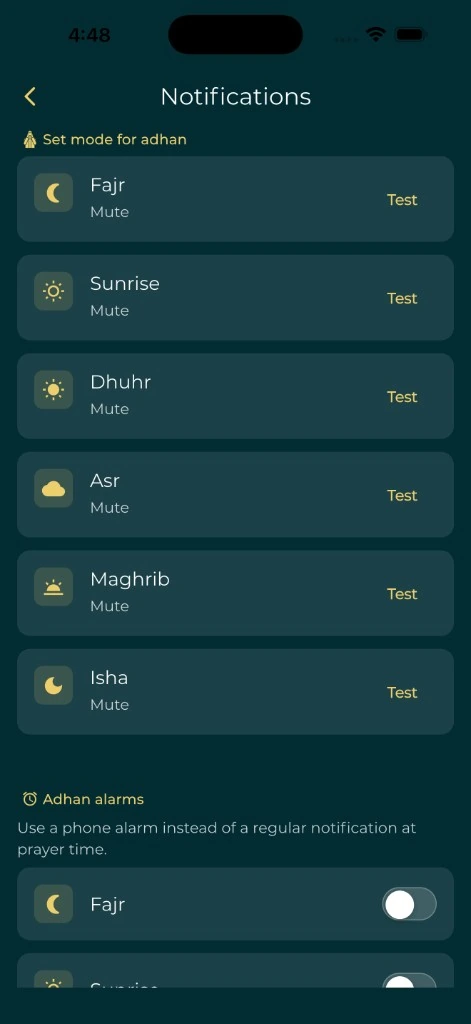
Open the app and check that the displayed prayer times match the location and calculation settings you expect. Then open Settings and make sure Adhan notifications is enabled. Open that setting and review the selected sound or mode for each prayer.
An adhan set to None or a silent mode will not play an audible call. Choose the reminder you actually want, confirm your phone's relevant volume and use any test or preview controls provided by the current app version.
When adhan is not working on iPhone
In iPhone Settings, open Notifications and find Everyday Muslim. Confirm that notifications and sounds are allowed. Review Focus and notification-summary settings to see whether a reminder is being silenced or delayed.
Standard notification sounds and alarm-style features do not have identical behavior on iOS. Do not assume that a full adhan or an override of silent mode is supported in every situation. Open Everyday Muslim after an update or a long period away and review its current reminder settings.
When adhan is not working on Android
Open Android's notification settings for Everyday Muslim and review the prayer or adhan notification channels. Check both the app-level permission and the channel's sound setting. On supported Android versions, also review any alarm permissions requested by the app.
Some manufacturers restrict background activity or battery use aggressively. If reminders remain unreliable, review the device's battery settings for Everyday Muslim and follow the current in-app instructions. Settings names differ between manufacturers, so avoid changing unrelated system permissions.
If the time looks wrong
A notification can be arriving correctly for the wrong schedule. Confirm the location, date, time zone, calculation method, Asr convention and any manual corrections before changing notification settings again.
Compare prayer start times with a trusted local timetable. Mosque iqamah times are not always the same as the start of the prayer window.
Understand prayer-time calculationsStill need help?
Contact support@umratech.com with your device model, operating-system version, Everyday Muslim version and the prayer that did not notify. Say whether the reminder was missing, silent, late or cut short.
A screenshot of the relevant settings can help. Do not include passwords, private partner records or your precise location if it is not needed to understand the problem. We cannot diagnose a device-specific issue from this guide alone.
A simple place to start
Make it part of your day.
Confirm the schedule
Make sure the app is showing the prayer time you expect.
Check each prayer's sound
Enable Adhan notifications and review the chosen mode or recording.
Review phone permissions
Use the iPhone or Android checks below.
Describe a repeatable problem
If it persists, send support your app/device versions and what happened.
A few useful answers
Before you begin.
Why is my adhan notification silent?
Check the per-prayer sound or mode, app notification permission and relevant device sound or Focus settings. A silent or None selection will not play an audible adhan.
Should I reinstall the app first?
Start with settings and permissions. Before reinstalling or clearing data, preserve any records and review the app's backup options so you do not lose information.
Does this guide guarantee a full adhan on silent mode?
No. Sound length, alarms and silent-mode behavior depend on the app feature, operating system and device settings. Follow the current app instructions.
Can the website send the adhan instead?
The online tool calculates prayer times; it does not schedule web adhan notifications. Use the mobile app for supported reminders.
Sources & further reading
Made by Muslims. For Muslims.
Keep your essentials close.
Prayer times, Quran, Qibla and worship trackers. Free and ad-free.