
Prayer & fasting · A little more consistent
A prayer tracker for everyday salah.
Record your five daily prayers, see your progress and keep coming back. Everyday Muslim brings salah tracking, prayer times and fasting records together in one free, ad-free app.
- Five daily prayers
- History, stats & streaks
- Free on iPhone & Android
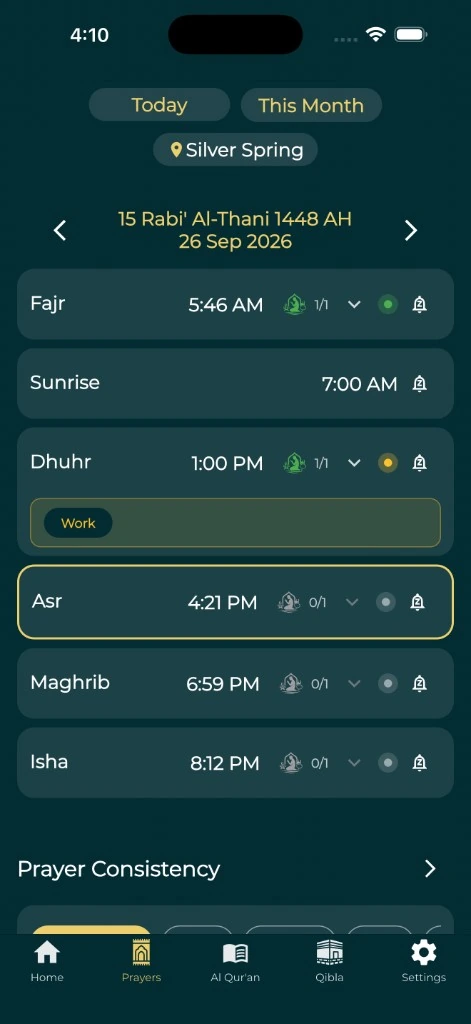
See your prayer routine clearly
A prayer tracker helps you remember what you have prayed and understand your routine over time. In Everyday Muslim, record prayers as you go, revisit your history and use detailed statistics to see where consistency is growing.
Keep your record alongside the prayer times for your location. You can spend less time moving between apps and more time getting ready for the next salah.
- Record completed prayers and review past days.
- See prayer statistics, your current streak and your longest streak.
- Follow milestones with medals and awards.
Prayer and fasting tracking, together
Your worship does not stop at a daily checklist. Keep prayer and fasting records in one calendar, add notes and record Sunnah or make-up fasts. A shared view makes it easier to return to the history you need.
The prayer tracker and fasting tracker serve different routines. Start here for your daily salah, then explore the fasting guide for the calendar and make-up fast workflow.
Explore the Islamic fasting trackerMake room for the next prayer
A log shows where you have been. Prayer reminders help with what comes next. Set up adhan notifications, check the next-prayer countdown and choose the calculation settings appropriate for your location.
If distractions are the obstacle, enable optional Prayer Lock to pause selected apps for protected prayers. If encouragement helps, connect with trusted Khair Partners and choose what progress to share.
Encouragement on your terms
Prayer records can be personal. Use the app without an account for the features that do not need one. Optional account, backup and social features involve the processing described in the privacy policy.
Choose a routine you can return to. A missed entry does not have to end your use of the tracker; review your record and continue with the next prayer.
A simple place to start
Make it part of your day.
Set your prayer times
Choose your location and review the calculation method before relying on reminders.
Record your salah
Use the prayer tracker to log completed prayers and revisit your daily record.
Review your progress
Look at history, statistics and streaks to understand your routine.
Add support if it helps
Explore Prayer Lock or Khair Partners when you want help with focus or accountability.
A few useful answers
Before you begin.
Is this a free salah tracker app?
Yes. Everyday Muslim is free and ad-free. Optional support purchases help fund development; you do not need them to start tracking your prayers.
Can I track prayers and fasting in the same app?
Yes. Everyday Muslim includes prayer and fasting records, calendar history, notes and statistics. It supports recording Sunnah and make-up fasts.
Can I track prayers with friends?
Khair Partners lets you connect with trusted people, choose which worship areas to share and encourage one another. Those social features are optional.
Are prayer records always stored only on my phone?
Do not assume that for every feature. Optional cloud backups and shared activity can be stored using Firebase services. Read the current privacy policy before enabling account, backup or social features.
Made by Muslims. For Muslims.
Keep your essentials close.
Prayer times, Quran, Qibla and worship trackers. Free and ad-free.