
Prayer times · No ads between you and salah
Know the time. Make space for prayer.
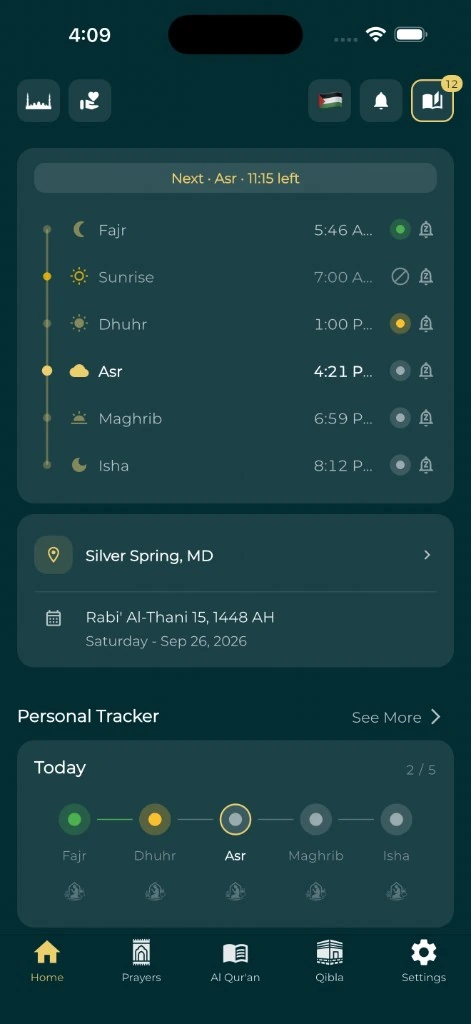
Check today's prayer times below, or keep them close with Everyday Muslim: a free prayer times app with no ads, customizable adhan reminders and a countdown to your next salah.
- Adhan reminders
- iPhone & Android
- Free & ad-free
Free online tool · Calculated in your browser
Today's prayer times
Choose a date, location and calculation settings. Follow your trusted local timetable.
Your selected prayer schedule
Prayer times for where you are
The online calculator shows Fajr, sunrise, Dhuhr, Asr, Maghrib and Isha for the selected place and Gregorian date. Sunrise is shown for reference; it is not one of the five daily prayers. Use a preset city or enter coordinates and the city's time zone.
Times are astronomical calculations, not a mosque's jamaah timetable. Choose the method and Asr convention used by your local community, and compare the results with a trusted local timetable. Time-zone and daylight-saving changes are handled using the selected IANA time zone.
An adhan app without advertising
In the mobile app, use automatic location detection or choose your location manually. Review prayer calculation settings, customize adhan notifications and keep an eye on the countdown to the next prayer.
Everyday Muslim is free and ad-free on iPhone and Android. Optional support purchases help keep the project running. Prayer tracking, Quran reading and Qibla tools are part of the same app, so the time for salah is connected to the rest of your daily worship.
Why prayer times can differ
Calculation methods use different conventions for Fajr and Isha. The selected Asr convention can change the afternoon prayer time. A mosque may also publish iqamah or congregation times, which are different from the beginning of a prayer window.
Check the date, location, time zone, method and Asr setting before comparing two schedules. At high latitudes, twilight and sunrise may not behave as they do nearer the equator; the calculator applies the library's high-latitude rule and identifies unavailable times rather than inventing a local timetable.
Set up reminders on your phone
Allow notifications for Everyday Muslim and choose the adhan settings you want for each prayer. iPhone and Android handle alarms, background work and notification sounds differently, so review the settings for your device.
If an adhan does not sound, start with the notification guide. Checking permissions and the selected prayer sound is more useful than repeatedly reinstalling the app.
Fix adhan notification problemsA simple place to start
Make it part of your day.
Choose your location
Use a city preset, enter a place manually, or request location access.
Match your local method
Review Fajr/Isha calculation settings and the Asr convention.
Choose your adhan
In the app, enable notifications and select the reminders you want.
Keep the next salah close
Use the countdown and supported widgets, then record your prayer in the tracker.
A few useful answers
Before you begin.
Is Everyday Muslim a free prayer times app with no ads?
Yes. Everyday Muslim is free and ad-free. You can make an optional support purchase, but it is not needed to view prayer times.
Does the website send adhan notifications?
No. This web tool calculates a schedule. Download the mobile app for adhan notifications and supported prayer widgets.
Does the online calculator send my coordinates to a server?
The calculations run in your browser using a locally hosted library. The tool does not send its coordinates in analytics events or a location API request. Optional website analytics still follow your consent choice.
Why does the time differ from my mosque?
Confirm that you are comparing prayer start times rather than iqamah, then match the date, coordinates, time zone, calculation method and Asr convention. Follow your trusted local guidance.
Sources & further reading
Made by Muslims. For Muslims.
Keep your essentials close.
Prayer times, Quran, Qibla and worship trackers. Free and ad-free.