
Everyday Muslim · Make the app yours
Make Everyday Muslim feel like your space.
Choose the colors, text and layout that help you use the app comfortably. Put your daily tools within reach and give the screens you return to a familiar feel.
- Colors & fonts
- Wallpapers & Home layout
- Prayer, Qibla & StandBy styles
Start with text you can read comfortably
Explore the app’s font and appearance settings to make everyday reading easier. Test the result on a prayer screen and a longer reading screen before settling on a combination.
Different features can have their own text controls. Quran and dua settings let you adjust reading content separately from the general interface, so one global choice does not have to serve every purpose.
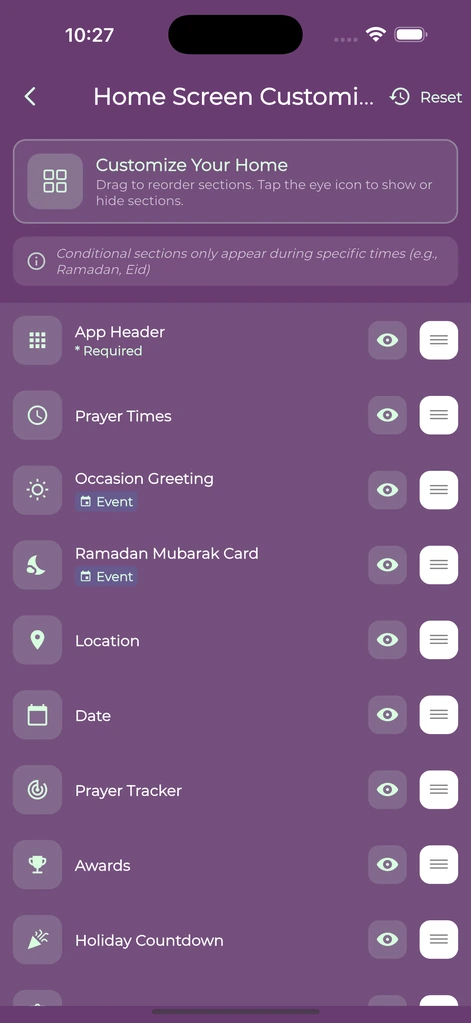
Give your Home Screen a useful order
Use Home layout controls to organize sections around the features you actually use. Bring a regular tool closer and reduce the effort needed to find it each day.
The app’s customization also includes colors, wallpapers and related presentation controls. Try the Home preview and check that the resulting contrast still makes times, labels and buttons easy to read.
Choose a prayer and Qibla presentation
Prayer layouts and time formats let you change how the schedule is presented. Qibla style controls offer another way to tailor the display, while StandBy has its own themes.
Appearance changes do not replace calculation settings. If a prayer time itself looks wrong, review the location, method and Asr convention rather than changing the visual layout.
Review prayer-time settingsExtend the look to supported widgets
On supported iOS versions, individual widget appearances can use a saved color or photo style. Check your installed version and Edit Widget options for what your device supports.
Start with one or two useful widgets and make sure their text remains readable over the chosen background.
Set up prayer and Quran widgetsA few useful answers
Before you begin.
Can I change the app’s colors and fonts?
Yes. Everyday Muslim includes appearance controls for colors and fonts, with additional reading settings in features such as Quran and duas.
Can I rearrange Home sections?
Yes. The app includes Home layout controls so you can organize sections around the tools you use.
Will a theme change my prayer times?
No. Visual layout and calculation settings are separate. Review location and calculation settings if a time needs checking.
Can every phone use custom widget photos?
Individual widget appearances require supported features and versions; the current iOS appearance controls require iOS 17 or later.
Made by Muslims. For Muslims.
Keep your essentials close.
Prayer times, Quran, Qibla and worship trackers. Free and ad-free.