
Everyday Muslim · Zakat calculator app
A Zakat calculator app to organize your estimate.
Bring your figures together with simple or advanced calculation modes, choose your currency and review the nisab inputs. Everyday Muslim keeps a history you can return to next time.
- Simple & advanced modes
- Currency & nisab inputs
- Saved calculation history
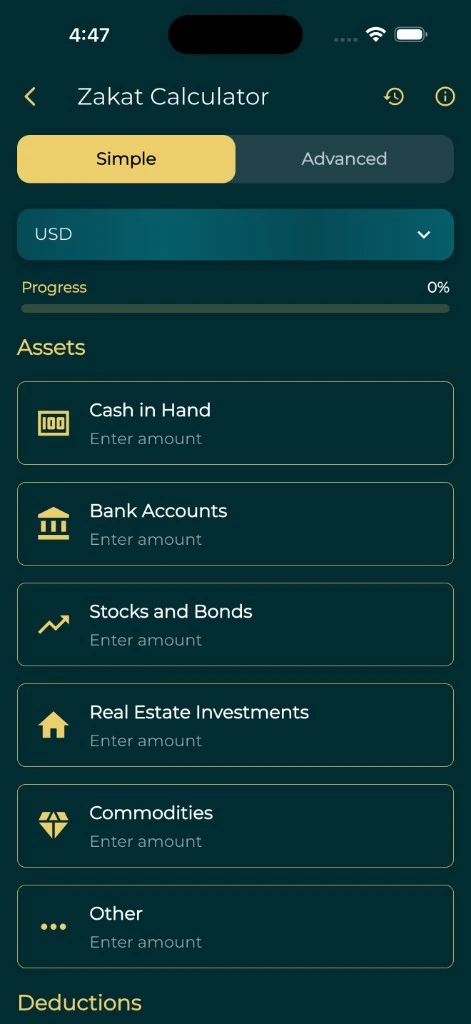
Choose a level of detail that fits your records
Open the Zakat calculator in the app and choose simple or advanced mode. Use simple mode for a concise set of figures, or advanced mode when you want to work through the available asset categories in more detail.
Gather your balances and valuations first, using a consistent date and currency. Keep a note of how you obtained the figures so you can review the estimate later.
Review the currency and nisab settings
The calculator includes currency selection and gold-price inputs for its nisab calculation. Check the displayed price, units and threshold instead of assuming that a saved value is current or that it matches the approach you follow.
Nisab is the threshold used when assessing whether Zakat is due; it is not simply a deduction from wealth that otherwise qualifies. National Zakat Foundation explains this distinction in its guidance. Ask a qualified adviser about the basis and rules appropriate to your situation.
Keep an estimate you can revisit
Save a calculation when you want a record of the inputs and result. The history screen separates the simple and advanced calculations so you can find an earlier estimate.
Saved history is a calculation record. It does not show that a payment was made, transfer funds to a charity, or establish that a recipient is eligible.
Get help with the questions arithmetic cannot answer
Different assets, debts, pensions, business interests and personal circumstances can require specific advice. Confirm which items belong in your calculation and the relevant holding-period rules with a qualified Zakat adviser.
This page explains the app’s calculator and does not calculate an amount in your browser. Treat an app result as an estimate based on its inputs, and resolve any uncertain assumptions before paying.
National Zakat Foundation guidanceA few useful answers
Before you begin.
Is there a Zakat calculator in Everyday Muslim?
Yes. The mobile app has simple and advanced modes, currency and nisab settings, and saved calculation history.
Does this page calculate my Zakat online?
No. This page explains the calculator in the mobile app. No personal financial figures are entered here.
Is the displayed gold price guaranteed to be current?
Check the price and units shown in the app. Do not assume a saved or displayed value is current or appropriate for the basis you follow.
Can the app decide all Zakat rules for my circumstances?
No. It performs a calculation from the supplied inputs. Ask a qualified adviser about uncertain assets, deductions, nisab basis and holding-period requirements.
Sources & further reading
Made by Muslims. For Muslims.
Keep your essentials close.
Prayer times, Quran, Qibla and worship trackers. Free and ad-free.